Excel bookkeeping templates are risky: what to use instead
A free Excel bookkeeping template feels safe because you can see every number and every formula. That visibility is also the risk: nothing in a bare spreadsheet stops a formula error, an overwritten cell or an unbalanced entry from quietly distorting every report built on top of it.
Where ad hoc spreadsheets actually go wrong
A single bad formula breaks everything downstream. Most templates chain a P&L off a summary tab that sums a transactions tab. Change one cell reference, insert a row in the wrong place, or paste a value over a formula, and every total that depends on it is now wrong, often silently, because the cell still shows a plausible-looking number.
There is no audit trail. A generic spreadsheet does not record who changed a figure, when, or what it replaced. If a balance looks off three months later, there is no history to check, only the current state of the file.
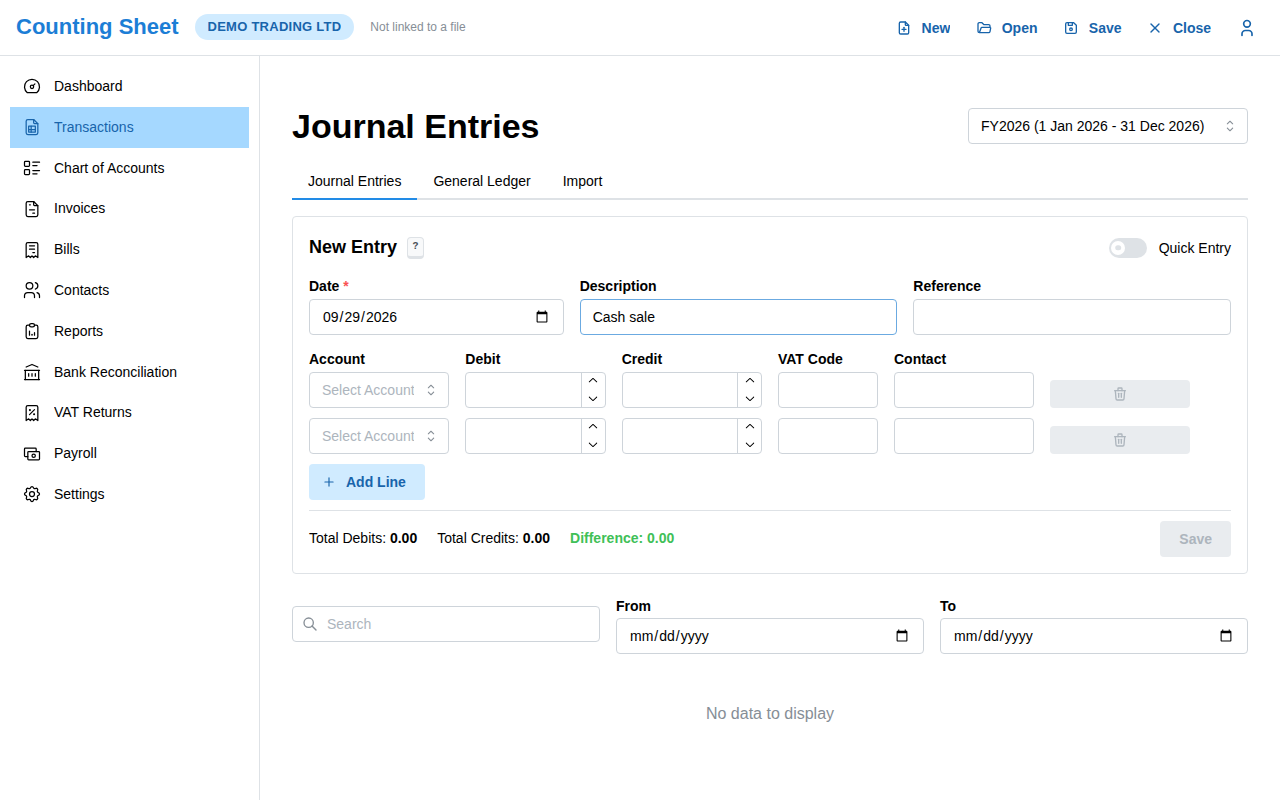
Nothing enforces that debits equal credits. Proper bookkeeping is double-entry: every transaction hits at least two accounts, and the two sides must balance. A blank spreadsheet has no concept of this. You can type a number into one cell and simply forget the other side, and the sheet will not complain.
One misplaced keystroke overwrites a formula. Typing a value directly into a cell that used to hold a formula is invisible until a much later total looks wrong, and by then it can be hard to tell which of dozens of cells was the one that got overwritten.
There are no built-in reports. A trial balance, a balance sheet, a cash flow statement: in a bare template these are either missing entirely or hand-built, which means they carry the same formula risk as everything else, doubled.
What Counting Sheet adds, on the same kind of file
Counting Sheet keeps the part of the spreadsheet model that works, a real, inspectable .xlsx file that you and your accountant can open directly, and removes the part that does not: manual, unvalidated arithmetic.
Every entry goes through a proper chart of accounts and a journal with explicit debit and credit lines, and the system refuses to post anything that does not balance. That single rule closes off the most common way a bare spreadsheet drifts from reality. Reports (profit and loss, balance sheet, trial balance, cash flow) are computed from the validated journal, not built by hand on a separate tab, so they cannot get out of sync with the entries behind them.
The underlying file is still stored in your own OneDrive, Google Drive or Dropbox, so nothing about moving to Counting Sheet costs you the transparency that made a spreadsheet appealing in the first place. Bank reconciliation against a CSV or OFX statement, contacts, invoices and bills sit on top of the same validated ledger, and fiscal year close carries balances forward automatically instead of relying on someone copying figures into a new tab in January.
The trade-off is worth naming honestly
A bare template is free and infinitely flexible, and for a genuinely tiny operation with a handful of transactions a month, that flexibility can be enough. The risk grows with volume and with the number of people who touch the file: the more transactions, users and months of history, the more likely one of the failure modes above quietly costs you a wrong number on a report a lender, an investor or a tax authority actually reads. Validated double-entry on a spreadsheet you still fully own is the middle ground between rebuilding your own checks by hand and giving up visibility entirely to a closed SaaS database.
Frequently asked questions
Is a spreadsheet template really that risky for bookkeeping?
The file itself is fine; the risk is that nothing checks the arithmetic. A single overwritten formula or unbalanced entry can distort every downstream report without any warning.
What does "debits must equal credits" actually protect against?
It is the core check of double-entry bookkeeping. If a transaction only touches one account, or the two sides do not match, the books no longer reconcile. Counting Sheet refuses to post an entry that does not balance.
Do I lose the ability to open the file directly if I switch to Counting Sheet?
No. Counting Sheet writes to a real .xlsx file in your own OneDrive, Google Drive or Dropbox, so you can still open it in Excel at any time.